My 2026 AI Workflow: Episode II
OpenAI Strikes Back
My 2026 AI workflow article aged like fresh milk. It’s incredibly difficult to stay updated on all the new releases in this field, but that’s also what drives me to follow these evolutions as closely as possible. For me, we’re in the Renaissance of coding.
In these past two months, I’ve continued exploring these tools, and my working environment has changed substantially since I wrote the last article. So I wanted to give an update on my development environment and various odds and ends. I received some criticism/feedback on Reddit that, although quite rude and direct (but really, are you complaining about Reddit users?), was legitimate. So I want to structure the post differently, skipping the storytelling and getting straight to the facts.
The Models
Over these weeks (late December - mid February) I’ve tried:
- GPT 5.3 Codex
- Opus 4.6
- Kimi K2.5
- GLM 4.7 and 4.7 Flash
Lately, I’ve started to appreciate OpenAI’s models more and more. In the end, the circle has closed. I started with them, and now I’m back. GPT 5.3 Codex is less immediate than Opus, but generally, I prefer its responses and the thought process it adopts. From 5.2 to 5.3, there was a significant leap forward in response speed, and now it fits well into my workflow. Another strong point is definitely token usage. Codex has a much more conservative approach, and I can work without thinking too much about usage. Opus, on the other hand, has become a token-eating monster. With the new subagent spawning mode, it’s even more voracious, and the subscription limits are felt much sooner compared to Codex.
That said, both models are excellent and deliver the results I want, but if you’re a cheap bastard like me, I recommend Codex.
Looking around, I’m not the only one who thinks the Codex model is the best. People who definitely know better than me, like Dax, have reached the same conclusion.
For open models, Kimi K2.5 is the best. It’s fast, calls the right tools and skills, and today there’s even a free version on Opencode. The GLM models also perform well, but since I have the others available, I have no reason to use them (actually, there is one, but I’ll mention it in the subscriptions chapter). GLM 5 was recently released, but I haven’t tried it yet, and it’s free with Kilo CLI.
The Tools
In my opinion, the models have reached a level where choosing one over the other can come down to the developer’s personal preference. The race for tools, however, is far from over. I’ve tried:
- Codex (app)
- Claude Code
- Opencode
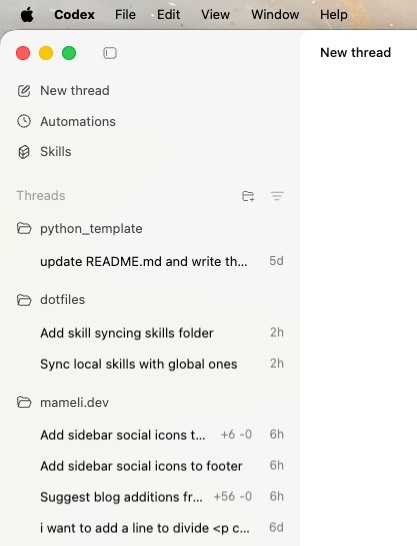
The Codex app is currently my preferred way to interface with OpenAI’s models. The interface is really convenient, and you can tell the developers are using it and listening to the user base. It’s not at all a given to have all the features at your fingertips, and navigating between various projects and threads is super convenient.
The combination of the Codex model, the Codex app, Codex on VS Code, and the ability to use OpenAI’s models on Opencode led me to subscribe to OpenAI Plus and cancel Claude Pro.
Anthropic has fantastic models, but I just couldn’t get into Claude Code. I always managed to get the desired result with this tool, but I ran into bugs far too often that I didn’t encounter in other tools. Sure, nothing that really blocked me from working, but screen flickering, @ for referencing files that didn’t work, and a confusing UI certainly didn’t help. It also bothered me that to get even a minimal idea of context usage, the model being used, etc., you need to configure the statusline in a very “hacky” way. There are tools like ccstatusline that help, but we’re talking about basic elements that are present by default on Opencode and Codex Cli, and there’s no reason to omit them unless it’s to deceive the user into using more tokens or the wrong model.
The straw that broke the camel’s back came three days after my Claude Pro subscription, when Anthropic decided to block third-party tools. To avoid wasting money or getting banned, I preferred to continue solely with Claude Code. At least I tried it, but what a test of patience…
I’ll also link Prime’s rant on the UI for some context.
Opencode remains my favorite tool for using open models. I abandoned Kilo Code because on VS Code I’m using the Codex extension, and for OpenRouter models, I prefer Opencode.
Skills, SubAgents, and MCP
I’ve become a skill guy. With Codex, it’s become very easy to create skills, and every time I think of something repetitive that I can turn into a skill, I create one. I believe this process is very personal, and I haven’t downloaded any skills from various sites like Vercel Skills or ClawHub. At most, I take inspiration, but I don’t copy them verbatim. The beauty of these models is that they can create skills perfectly tailored to one’s own needs, so I don’t see why I should rely entirely on others’. Not to mention “malicious” skills that can cause significant damage. Furthermore, the Codex app is very convenient because you get a clean view of your skills. If you still want to take a look at my skills, I’m using my dotfiles repo to keep skills in sync between my personal and work Macs.
I deleted the subagents because instead of calling the right subagent on Opencode, I rely on skills. I usually open and close sessions that handle one very specific thing. Using subagents is convenient for better context utilization, but if I open a new session every time, I don’t have to worry about this issue.
I don’t use MCP. I noticed I’m not the only one, quite the contrary. The tools are increasingly capable of doing web searches, using CLI commands, and MCP servers seem superfluous. Even the creator of OpenClaw is not a big fan, and I agree with him when he says they’re only good for adding clutter to the context. Even one of the most used MCPs, Playwright, recommends using the CLI version over MCP for agents.

Subscriptions
The best subscription for me right now is OpenAI Plus at €23. The model I prefer for coding is Codex 5.3 high, and having ChatGPT for everyday use is definitely useful. For this period (until April), there’s even higher usage with Codex, making it even more convenient. I also tried Claude Pro, but it’s truly a constant anxiety. I constantly hit the maximum usage of the 5 hours and the weekly limit using Opus, and had to switch to Sonnet to finish work tasks. As I said here, the difference between the two models isn’t that marked in the outputs produced or in benchmarks, but with the Claude Pro subscription, it’s difficult to complete what I need, and I have to be too careful with tokens and context. With Codex, I switch from xhigh to medium depending on how fast/simple the command is, and I don’t always have to keep an eye on the statusline.
As a backup, I also got an annual subscription to Z.ai Coding Plan. I only spent €24 for a whole year of usage, and I use it as an API key for small projects. Very recently, GLM-5 was released, and it’s not yet available in my plan, but there’s hope according to this tweet. It’s really asking too much, but it would be a great deal for users who subscribed to Lite with the Christmas holiday discounts.
I also evaluated Black from Opencode and Copilot. Black’s limits are vague, and from what I’ve read, it doesn’t seem very generous. For Copilot, the €10 plan is too limited, and the €40 one isn’t worth it given that OpenAI Plus exists for less.
To play with models, I remain faithful to Openrouter.
Misc
I’m very interested in the Openclaw project, but I think I won’t use it until it seems mature enough to me. It doesn’t seem useful enough for me to risk losing my account, API keys, or other things. I prefer to watch from a distance. Steipete seems very enthusiastic and charming, and I’m really curious to see how it goes.
The YouTube channels I follow for AI are:
- Theo
- Ben Davis
- Prime
- now Joma has joined too
- Antirez - I’m lucky to be Italian and be able to follow him too
- bycloud
- Caleb Writes Code
As an editor, I’m still using VS Code, and I just can’t get into Zed. There are still too many things missing compared to VS Code, and the speed factor is really superfluous on a modern computer. When they add good features for navigating git and add support for history with external ACP agent, then I might try it again, but it’s quite useless since I’m happy with VS Code.
In this Reddit thread, I found many interesting points on how to use Claude, but more generally, coding agents.